Copy to the next term
Start the new term from last term’s timetable instead of from zero; every lesson is re-checked for clashes.
School management, built Arabic first
From a single school to a group of schools with several branches and stages: students, timetable, attendance, marks, results and finance in one easy platform.
Organization
Al-Noor Education Group
Al-Noor School
Egypt branch
Saudi Arabia branch
Khartoum branch
Al-Amal School
Main branch
One login for every school · separate roles in each
See Siraj
A quick tour of a school day: the school dashboard and quick search, students and admissions, timetable and attendance, marks and report cards, finance and payroll.
Want to see Siraj running on your school data?
Narrated in Arabic, with on-screen titles.
Request a demoFits your structure
Start with one school and grow when you are ready. Stages, branches and sister schools are part of the core design, not add-ons.
Kindergarten, primary, middle and secondary under one roof, each with its own grade levels, school day and subjects.
Each branch keeps its own sections, timetable and staff, while the administration sees the whole school.
The owner compares every school side by side, from students to income, costs and fee collection, and opens any of them directly. Each school keeps its own data and permissions.
Timetable
No consultant and no tangled spreadsheets. Three steps, with SirajEdu checking for clashes as you go.
Define the school day
Set periods and breaks once. Stages and branches inherit them, and you change only what differs.
Assign teachers to subjects
Choose who teaches each subject in each section.
Fill the weekly board
Place lessons on the board. A teacher or room that is already busy is flagged immediately.
First Intermediate · Section B
Mr. Ahmed already teaches First Intermediate, Section A in this period
Start the new term from last term’s timetable instead of from zero; every lesson is re-checked for clashes.
Record a teacher’s absence and see which lessons need cover and who is free to take them.
Guardians on WhatsApp
SirajEdu messages guardians automatically: before an installment is due, when it becomes overdue, when a payment is received, when a student is absent or late, and when the report card is out.
Message from Al-Noor School: a reminder that Ahmed Ali has 1 charge totaling 1,500.00 due within 3 days. Thank you.
08:00
Message from Al-Noor School: we received a payment of 1,500.00 for Ahmed Ali. Receipt number: RCPT-0412. Thank you.
11:24
Thank you 🙏
11:30
Easy to use
Clear screens in proper Arabic, and tools that remove the work schools find most tiring.
A step-by-step checklist takes you from an empty school to your first school day.
Import students, guardians, staff, enrollments and opening balances from Excel or CSV with ready templates. Nothing is saved until every row checks out.
From any page, find a student, guardian, staff member or receipt and open it in seconds.
Built right to left from the start, with full English. Switch between them at any time.
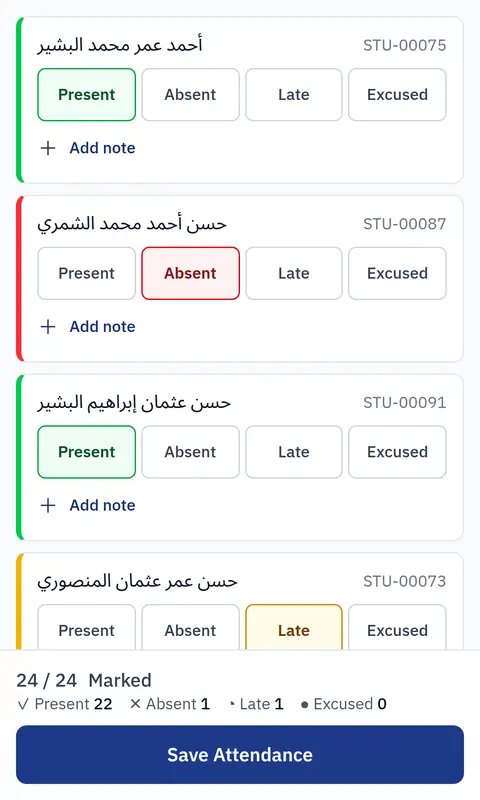
Teachers take attendance from their mobile browser, and every list adapts to small screens.
Report cards and receipts print on A4 with your school’s logo, signatory and footer.
Attendance
Grade 5 · Section A · Today
Everything connected
Each part feeds the next, so what your team enters once follows the student all the way.
Applications become students without retyping.
Profiles, guardians and enrollment history.
Daily attendance and absence reports.
Gradebook, approved results and published report cards.
Fees, payments, receipts, refunds and expenses.
Salaries and payroll runs for every staff member.
Staff records, access and daily attendance.
Files with expiry tracking and ready reports.
Control and trust
Give each person exactly the actions their job needs, school by school.
A teacher in one branch never sees another branch’s records.
Sensitive changes, such as reopening a result, record who, when and why.
Finalized results are frozen for each year and term; later edits never rewrite the past.
Questions
Yes. Download the ready templates, fill them with your current data and import students, guardians, staff, enrollments and opening balances. Every file is checked first, and nothing is saved while any row has an error.
Yes. Arabic is the main language, laid out right to left, and English is fully supported. Each user can switch between them at any time.
Yes. Branches and stages are part of the core structure: each branch has its own sections, timetable and staff, and each stage its own grade levels and school day.
Yes. Your schools sit under one organization: you compare them on one dashboard and open any of them, while each school keeps its own data, staff and permissions.
Yes. It works in the phone’s browser with nothing to install. Teachers take attendance and check their timetable from their mobile.
Yes. Installment reminders, overdue notices, payment receipts, absence and lateness alerts and report card notices go out automatically on WhatsApp, from the SirajEdu number or your school’s own number. Each school chooses which of them are sent.
Pricing depends on your number of schools, branches and students and on the modules you need. Request a demo and we will send you a clear proposal.
In a short demo we walk you through your own stages, branches and schools, from the first setup to the timetable.
Request a Demo